Map the process first
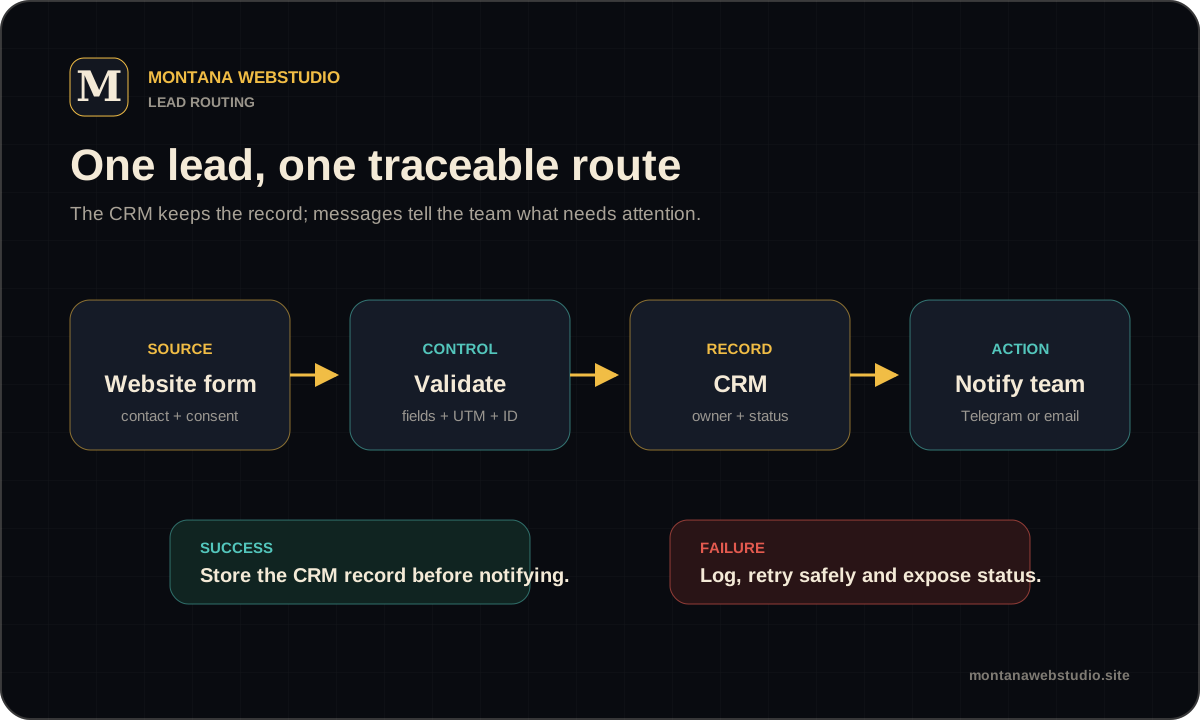
Describe the lead source, required fields, system of record, owner and next action. If a new lead should create a task or notify Telegram, that belongs to the same workflow.
Separate data entered by the visitor, added by the website and calculated by CRM. This prevents two systems from overwriting one field with different meanings.
Fields, UTM values and consent
Field names and types should match the API contract. Phone, email, source, campaign and enquiry page need agreed formats.
Transfer only necessary personal data and record consent where required. API secrets stay on the server rather than in the JavaScript bundle.
- A first-party lead ID for tracing.
- URL and referrer as context.
- UTM values without replacing known values with blanks.
- Time and timezone in a defined format.
Deduplication and idempotency
A visitor may click twice, the browser may retry, and a webhook may deliver the same event again. Without idempotency, duplicate leads and tasks appear.
The duplicate rule depends on the business: email, phone, order ID or a dedicated lead ID. Do not merge different people simply because they share a company address.
| Event | Protection |
|---|---|
| Repeated submit | Disable + request ID |
| Timeout after creation | Check ID before retry |
| Webhook repeats | Idempotency key |
| Same contact returns | New activity according to business rules |
What if the CRM is unavailable
The frontend should not report success before confirmed storage or a safe queue. Temporary failures need limited retries and a log that allows manual recovery.
A fallback Telegram or email message can help, but it must not expose secrets or unnecessary data. The recipient should know the lead is not yet in CRM.
- Record a safe request ID and status.
- Retry expected temporary failures only.
- Notify someone about a terminal failure.
- Reconcile logs with CRM after recovery.
How to test the integration
Test a valid lead, missing fields, invalid formats, duplicate submission, CRM outage and slow response. Verify UTM values, source, owner and the manager notification separately.
After deployment, run a marked production test and remove it through the agreed process.
Frequently asked questions
Can the browser send a form directly to CRM?
Usually not safely because it exposes the API secret. Use a server-side endpoint or an official secure connector.
Is Telegram needed when CRM exists?
Not necessarily. It is useful for fast notifications, while CRM remains the system of record.
How can lead loss be detected?
Reconcile server request IDs with CRM records and test failure paths, not only successful submissions.